6 Using the Built-in NS (Network Server)
6.1 Built-in NS Basic Operations
Built-in NS ChirpStack Login Credentials:
- Username:
admin - Default Password:
admin666666 - Page URL:
http://192.168.60.1:8080orhttp://WAN_IP:8080
6.1.1 Switching to Built-in NS Mode
Note:
- The gateway has built-in ChirpStack. Page URL:http://192.168.60.1:8080orhttp://WAN_IP:8080
- Using the built-in ChirpStack 4.19.0 as an example,
- Example gateway ID:0010502df45635f8
- Navigate to the gateway Web page: Network → LoRa GW → Configuration, and configure as follows:
- Gateway and server communication protocol (gateway-to-server communication protocol):Built-in Network Server
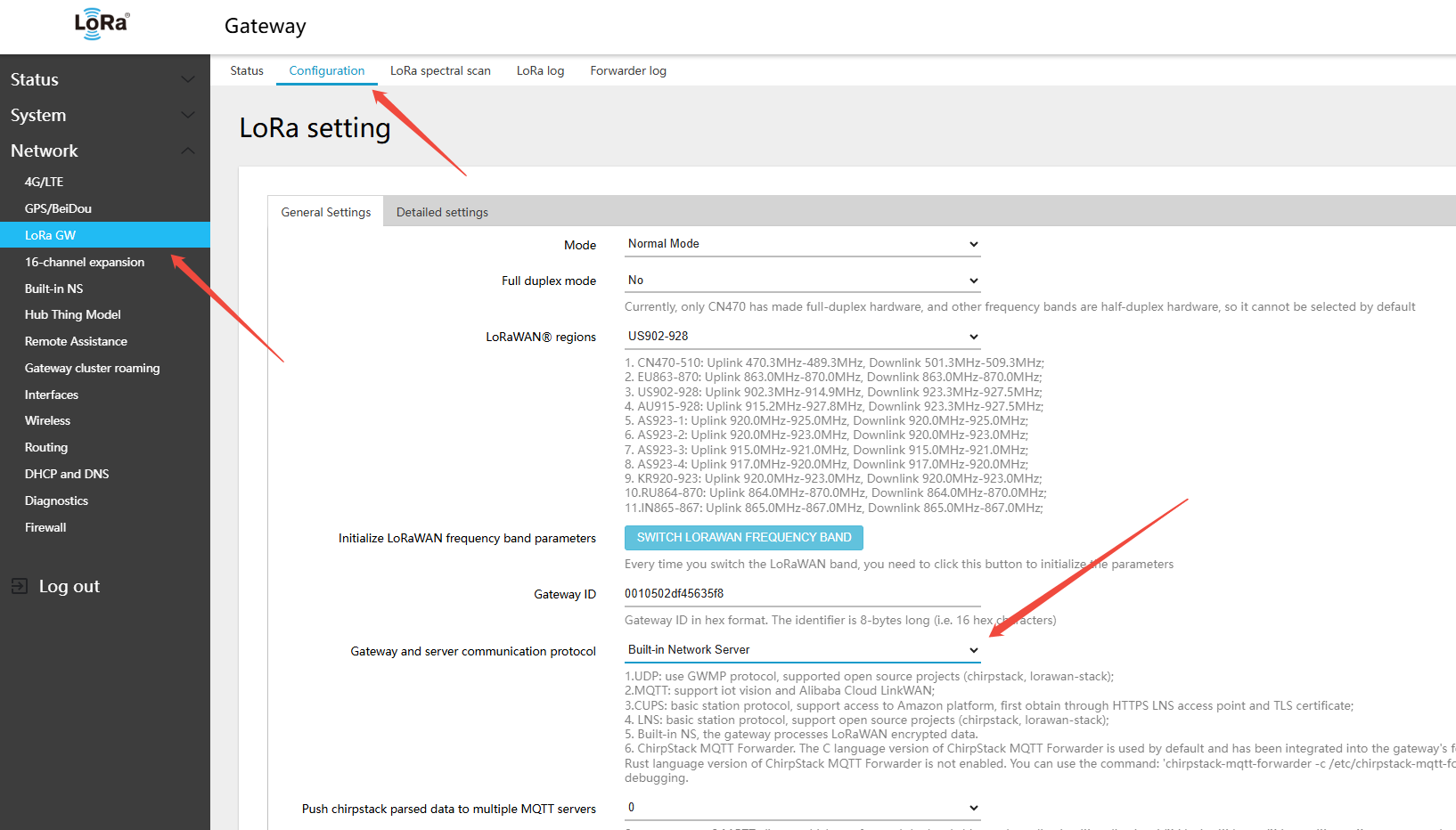
- Click Save & Apply in the lower-right corner of the page
6.1.2 Adding Winext Devices
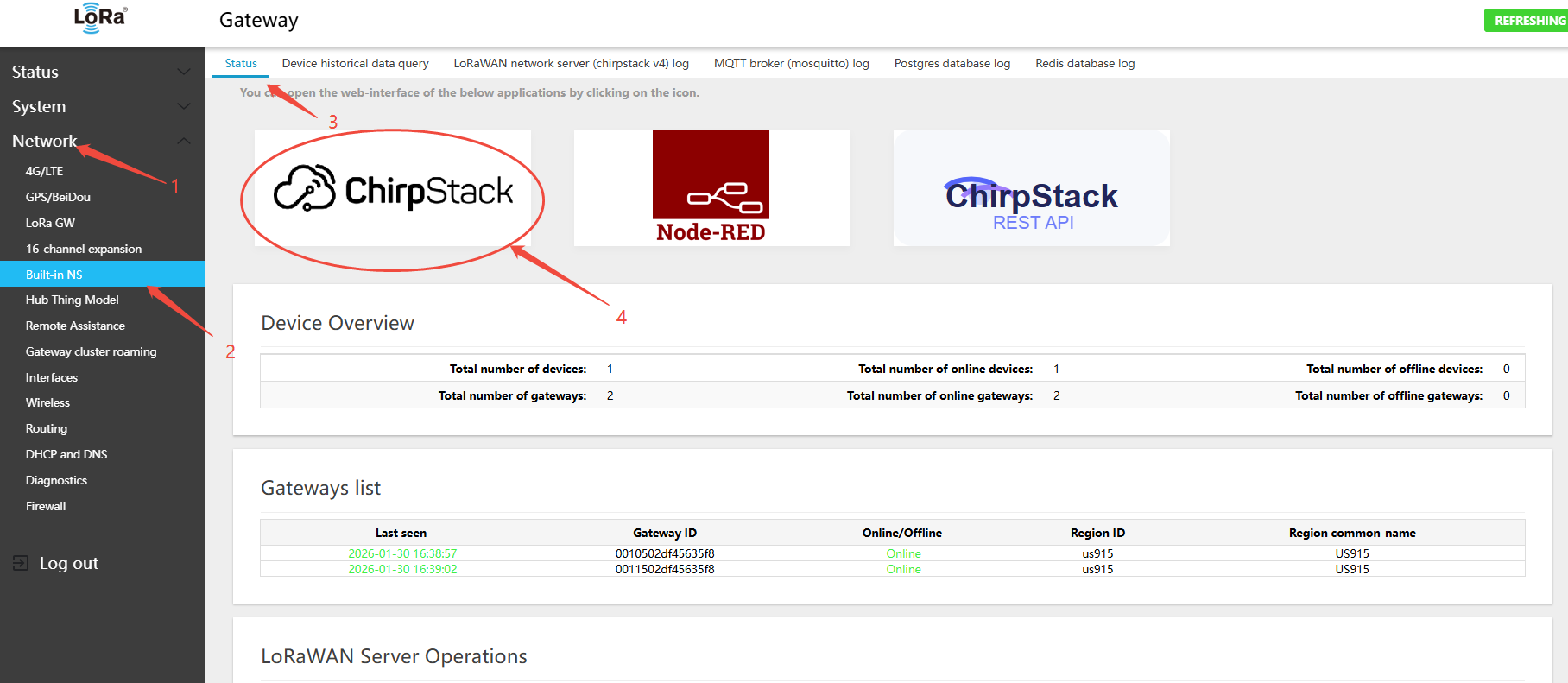
There are three ways to open the built-in NS (ChirpStack) page:
- Open a browser and navigate to
http://192.168.60.1:8080orhttp://WAN_IP:8080 - On the gateway Web page: Network → Built-in NS → Status
- Click the ChirpStack icon to open the ChirpStack login page in the browser
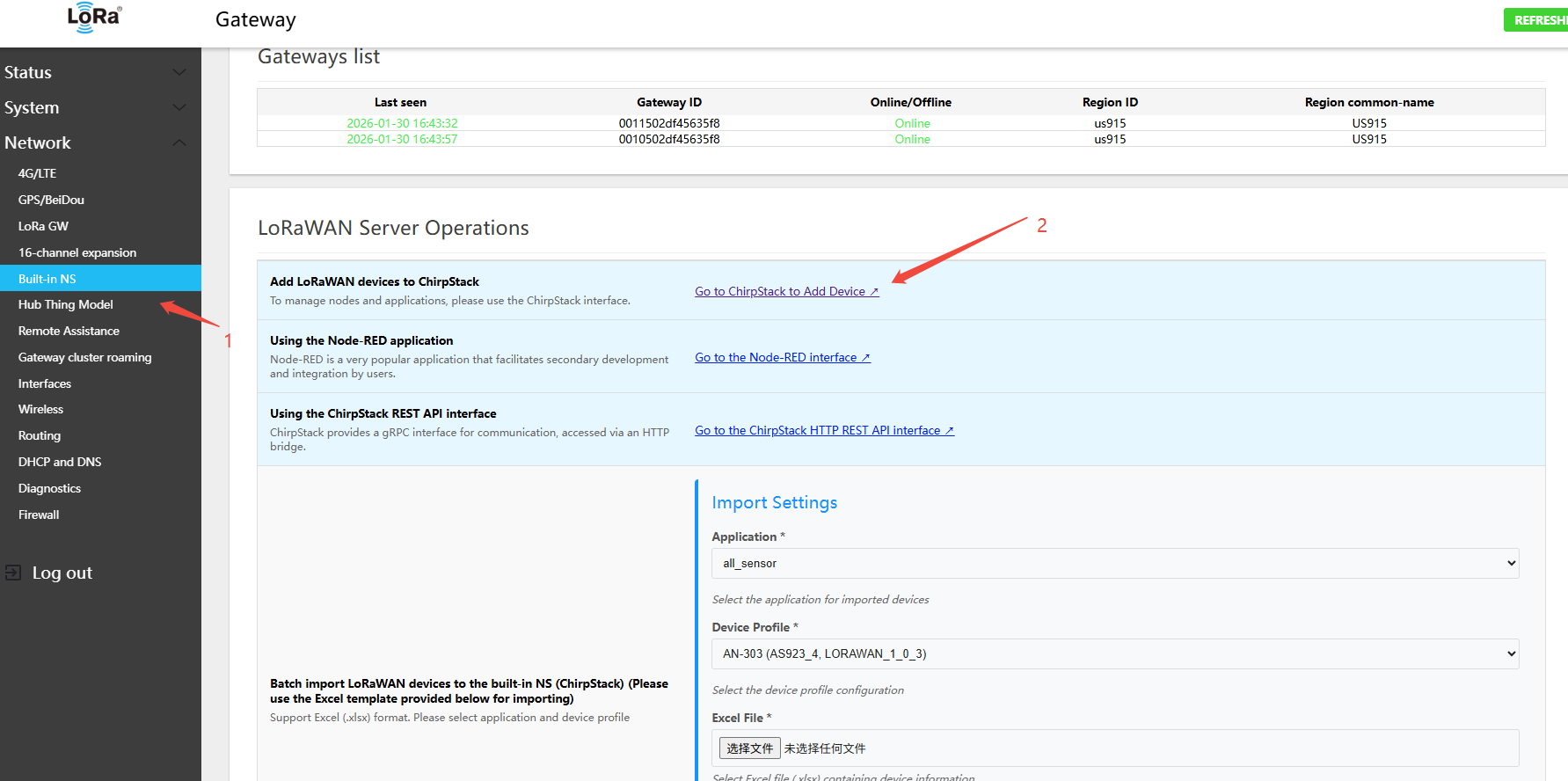
- Click the link
Go to ChirpStack to Add Device ↗to open the ChirpStack login page in the browser
- ChirpStack login — Username:
admin, Default Password:admin666666
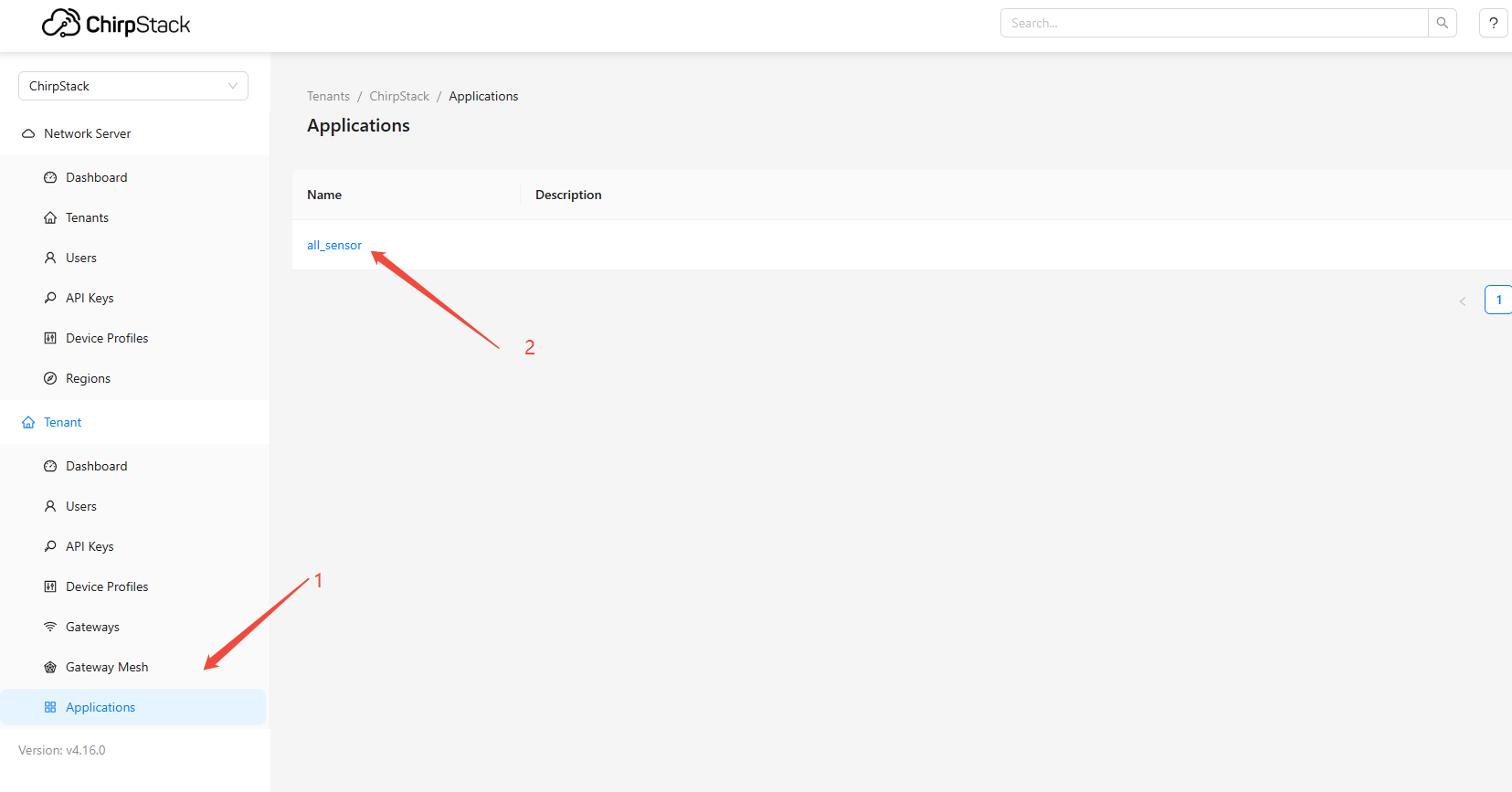
- In the ChirpStack UI, go to Applications menu, select
all_sensor, and click to enter
- Add a device; using
AN-303 Temperature & Humidityas an example
- In the
Device profiledrop-down, selectVendor→LoRaWAN Sensor→AN-303→ select LoRaWAN band (example: US915)
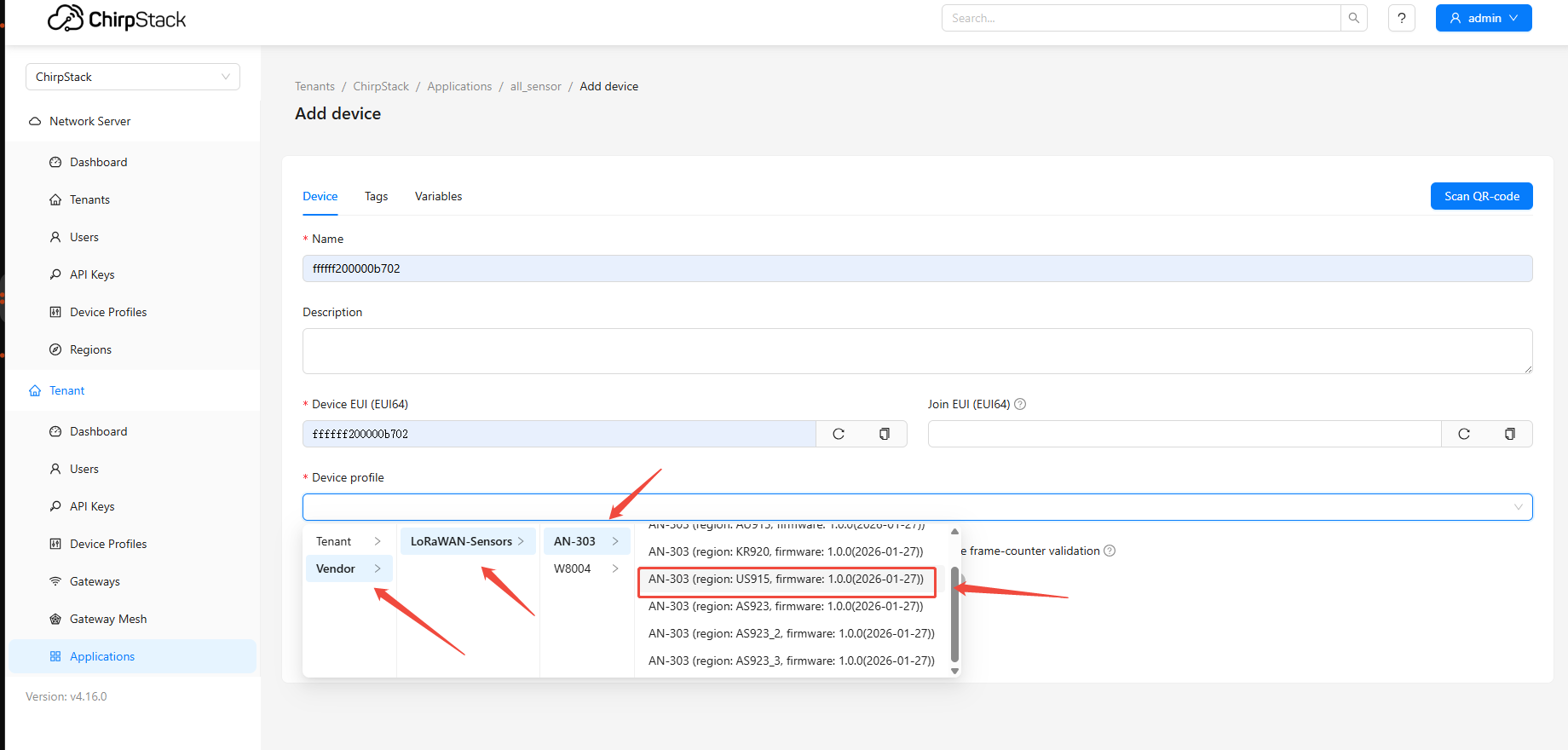
- After submission, enter the AppKey and other required information. Devices created this way will automatically link to the gateway's built-in JS codec — no custom parser is needed.
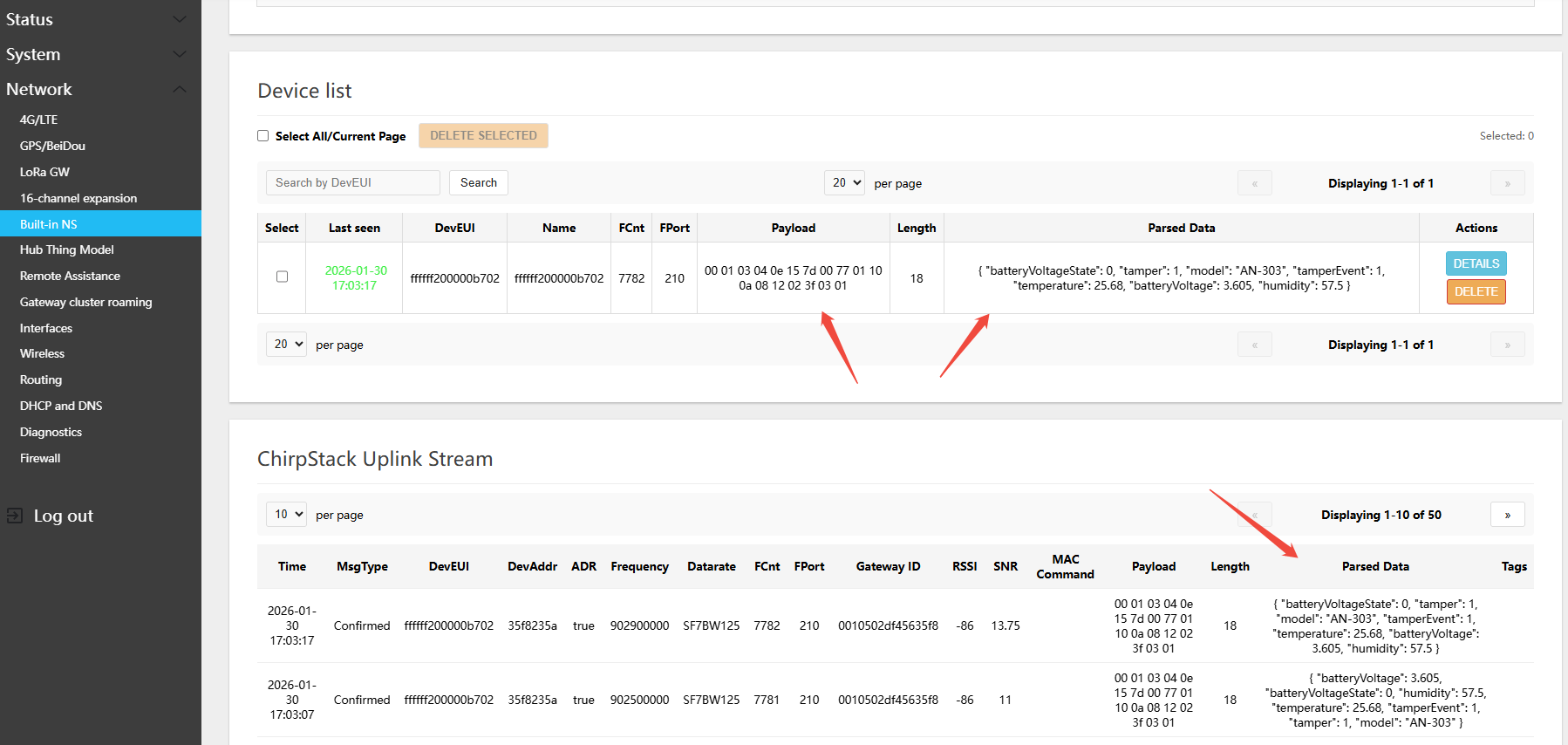
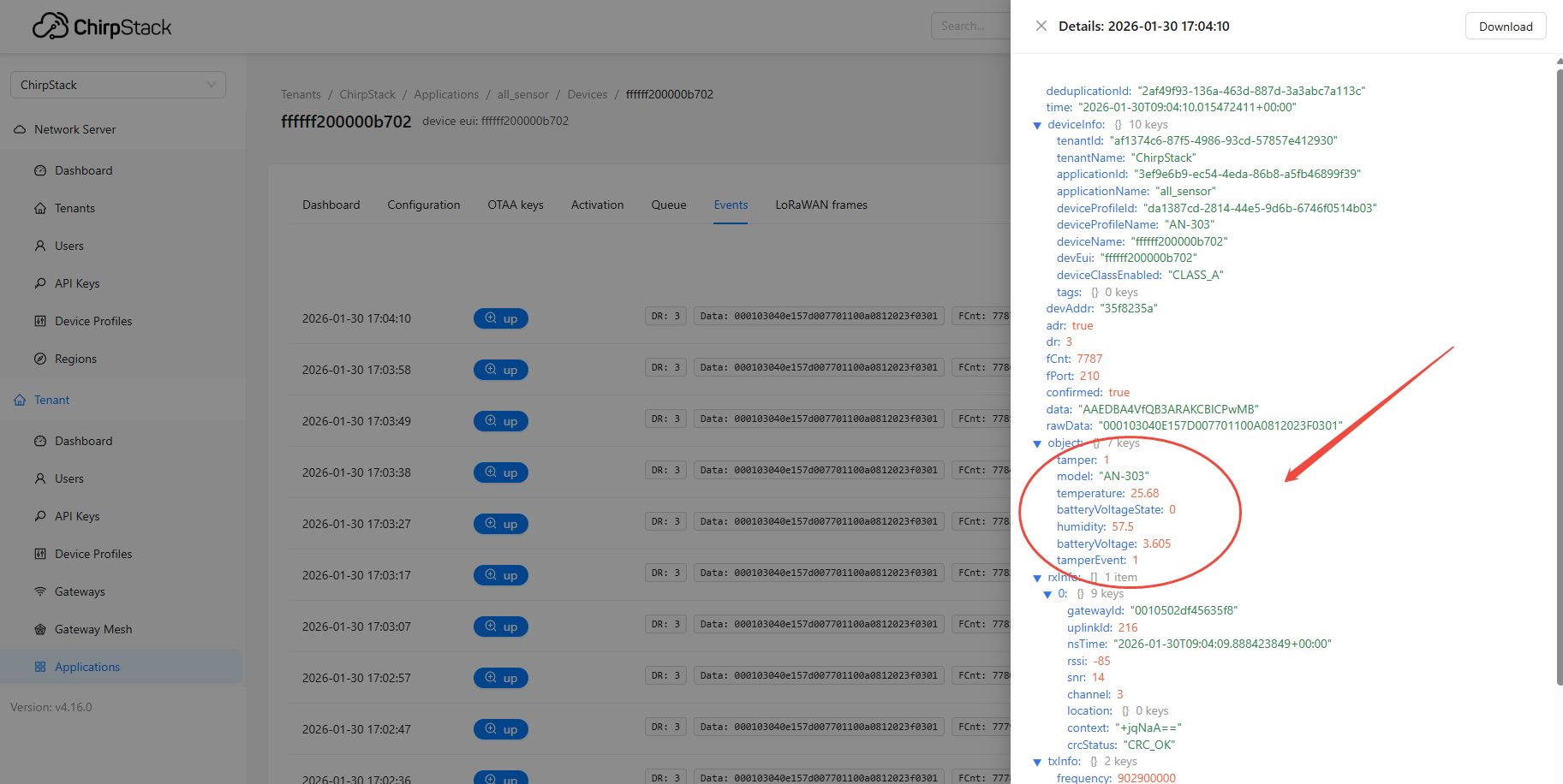
- After the LoRaWAN device powers on and joins, view device data using one of two methods:
- In the gateway Web UI: Network → Built-in NS → Status, scroll down to find Device list to view real-time device data
- You can also view device data on the ChirpStack page
6.1.3 Adding Third-Party Devices
- Open a browser and navigate to
http://192.168.60.1:8080orhttp://WAN_IP:8080
- ChirpStack login — Username:
admin, Default Password:admin666666
- Adding a device requires the customer to write a custom JS script
6.1.4 Device Management (Delete, Edit, Query)
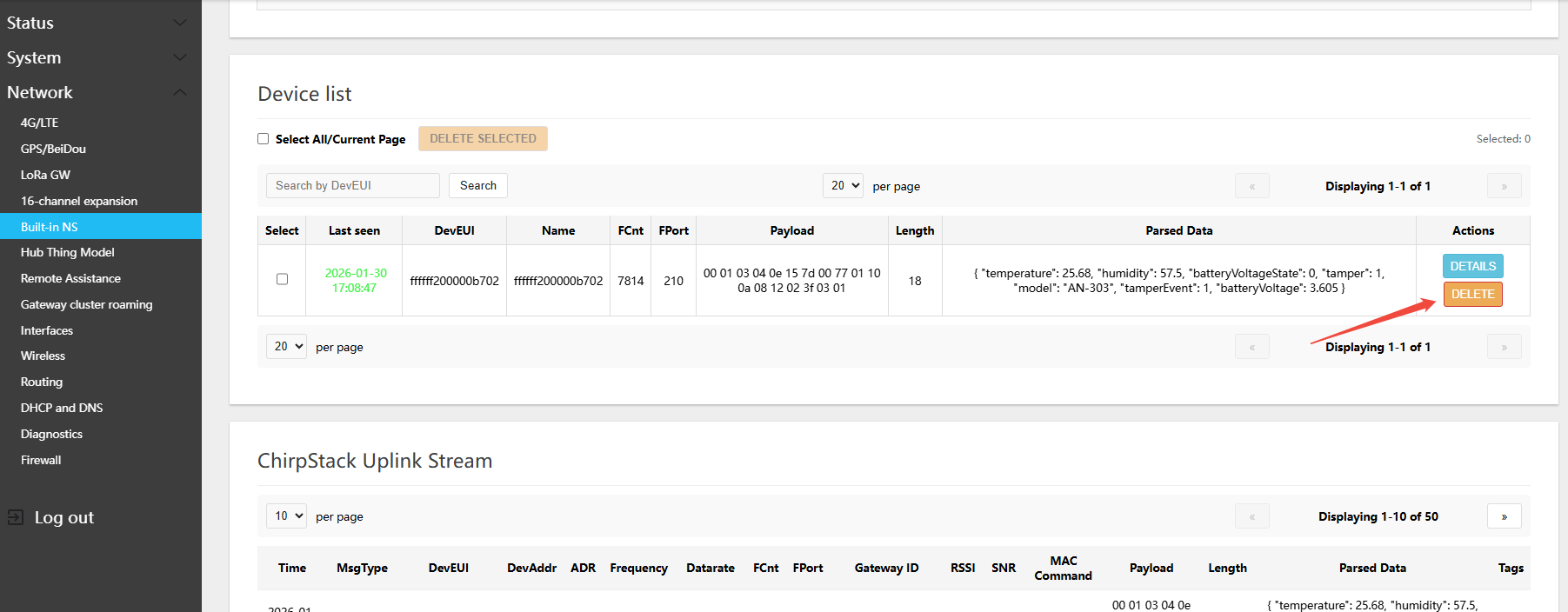
There are two methods: (1) single or batch delete on the gateway Web page; (2) single delete from the ChirpStack page.
- In the gateway Web UI: Network → Built-in NS → Status, scroll down to find Device list
6.2 Bulk Device Import/Export
6.2.1 Bulk Import
- In the gateway Web UI: Network → Built-in NS → Status, scroll down to find LoRaWAN Server Operations)**
- First download the Excel template for importing devices
- The IMX93-GW8016 gateway supports importing up to 2000 LoRaWAN devices
- The IMX93-GW8000 gateway supports importing up to 1000 LoRaWAN devices
- The IMX6-GW8000 gateway supports importing up to 100 LoRaWAN devices
6.2.2 Bulk Export
- In the gateway Web UI: Network → Built-in NS → Status, scroll down to find LoRaWAN Server Operations)**
- click EXPORT(export)
- Google Chrome may prompt you to keep or save the downloaded file
6.3 Advanced Development Tools
6.3.1 ChirpStack REST API Interface
- Open a browser and navigate to
http://192.168.60.1:8090orhttp://WAN_IP:8090 - In the gateway Web UI: Network → Built-in NS → Status, scroll down to find LoRaWAN Server Operations. You can copy the API call token there. Note: this token has an expiry time; for a long-term token, create one in the ChirpStack UI. key
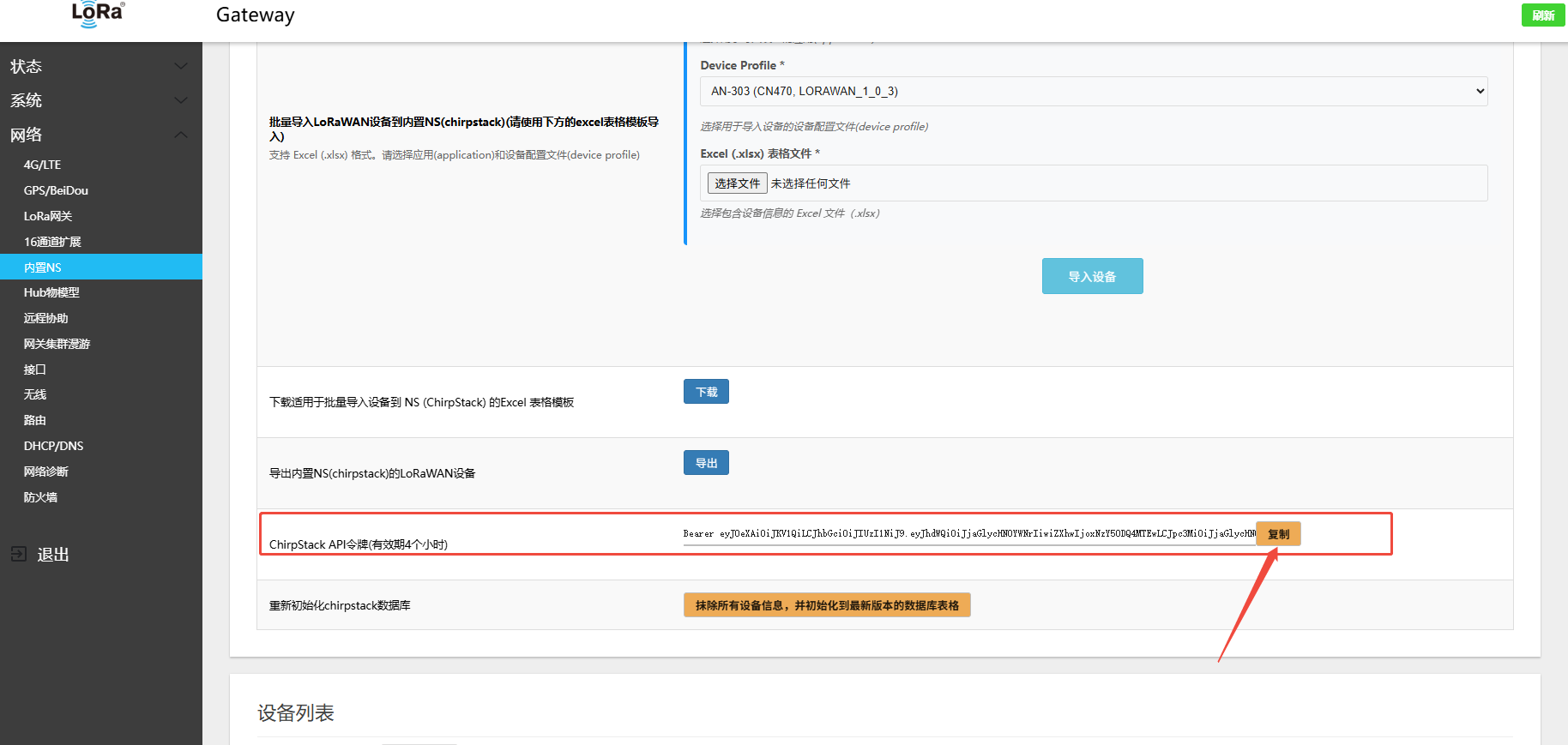
- API Authorization Token
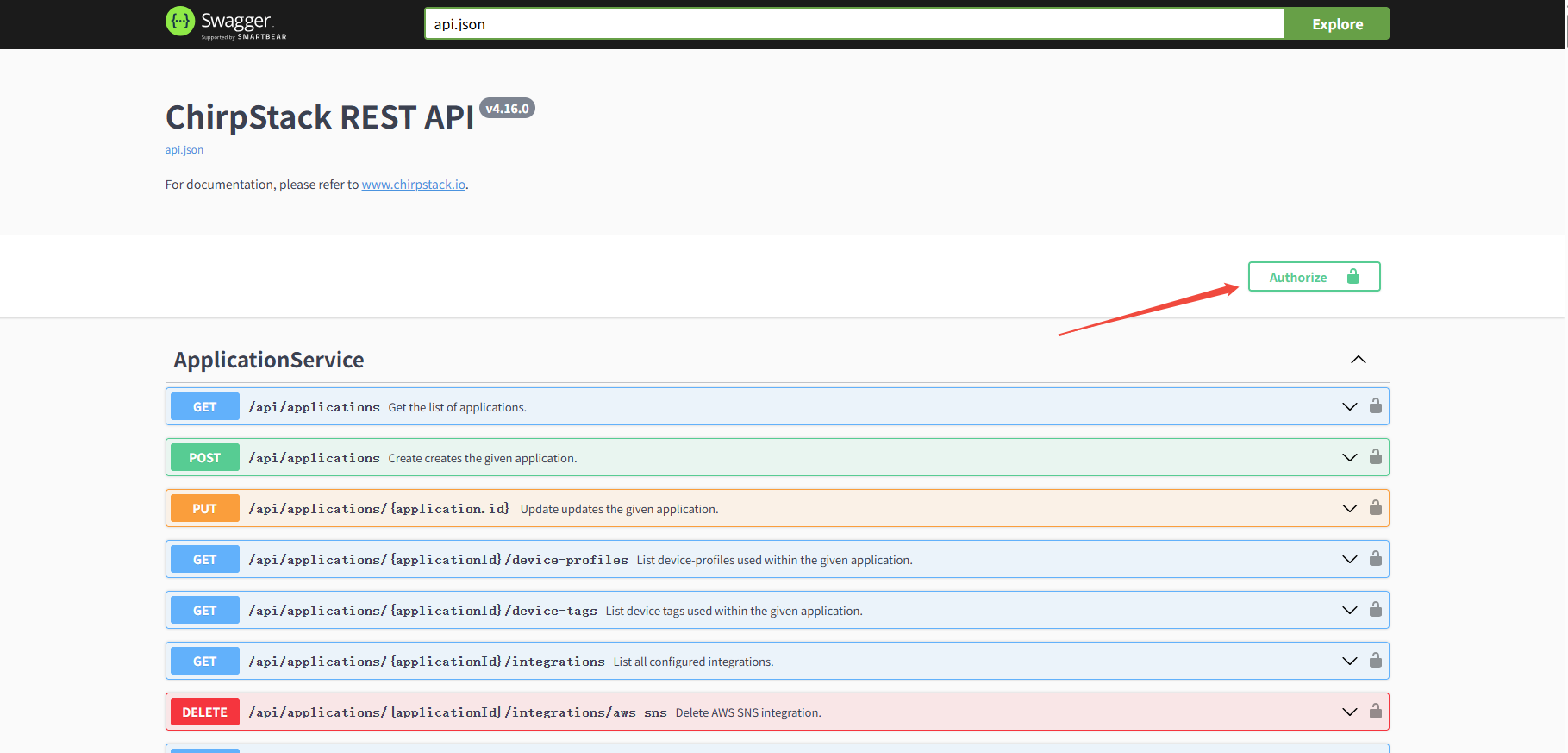
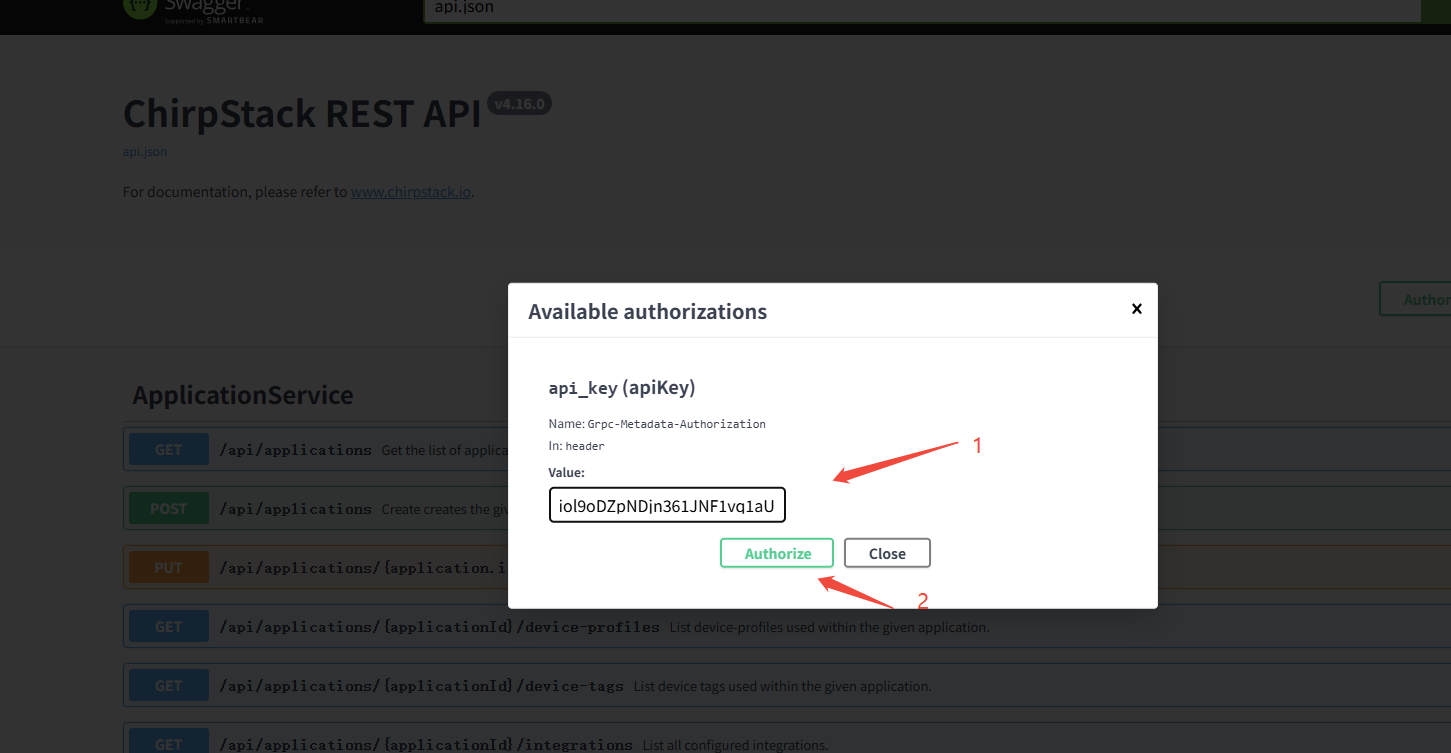
- Paste the token copied from the web page
- Try making an API call
6.3.2 Node-RED Interface
- There are two ways to access this page:
- Open a browser and navigate to
http://192.168.60.1:1885orhttp://WAN_IP:1885 - In the gateway Web UI: Network → Built-in NS → Status, click the
Node-REDicon or the hyperlink to open it
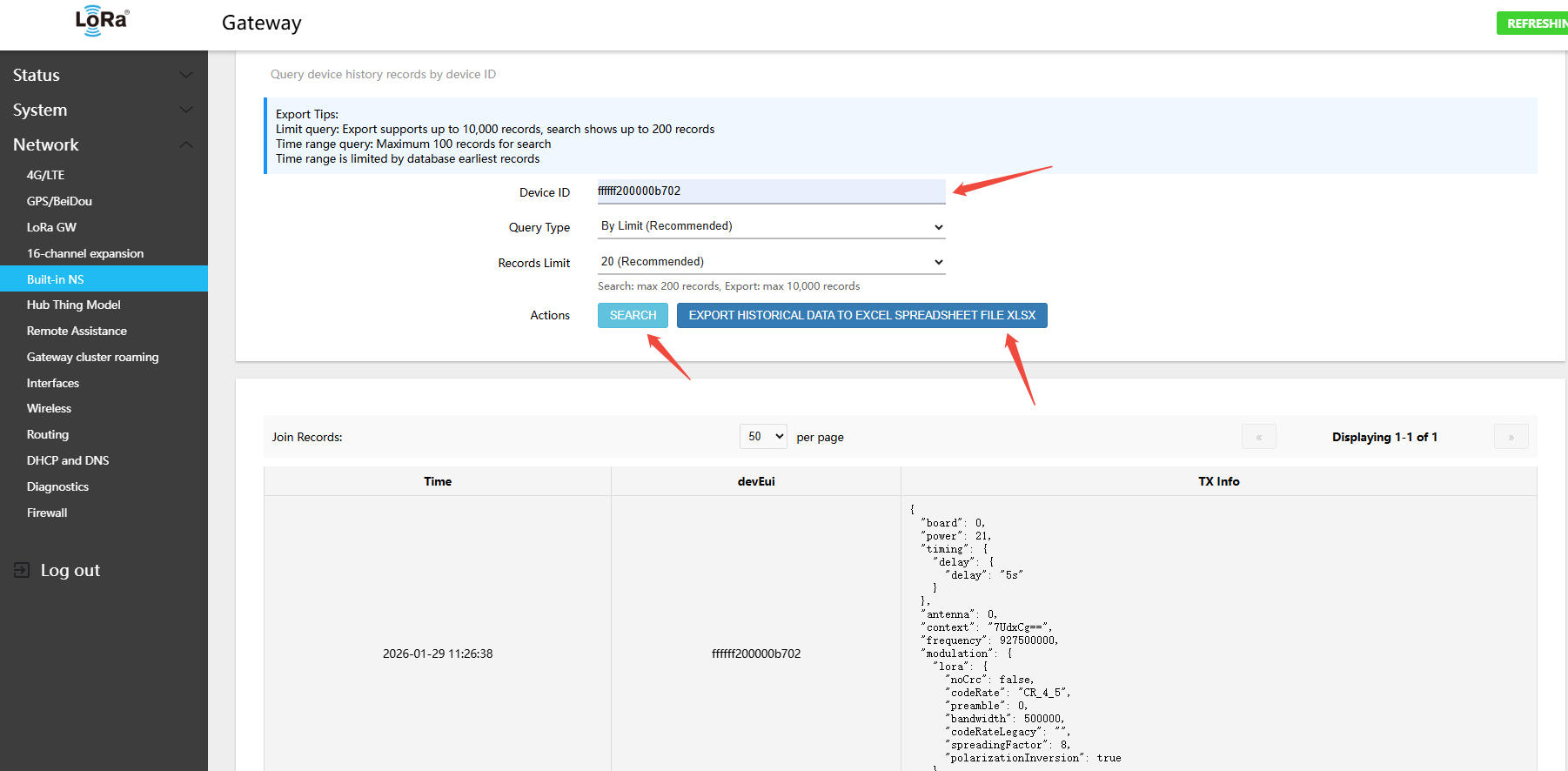
6.3.3 Historical Data Query
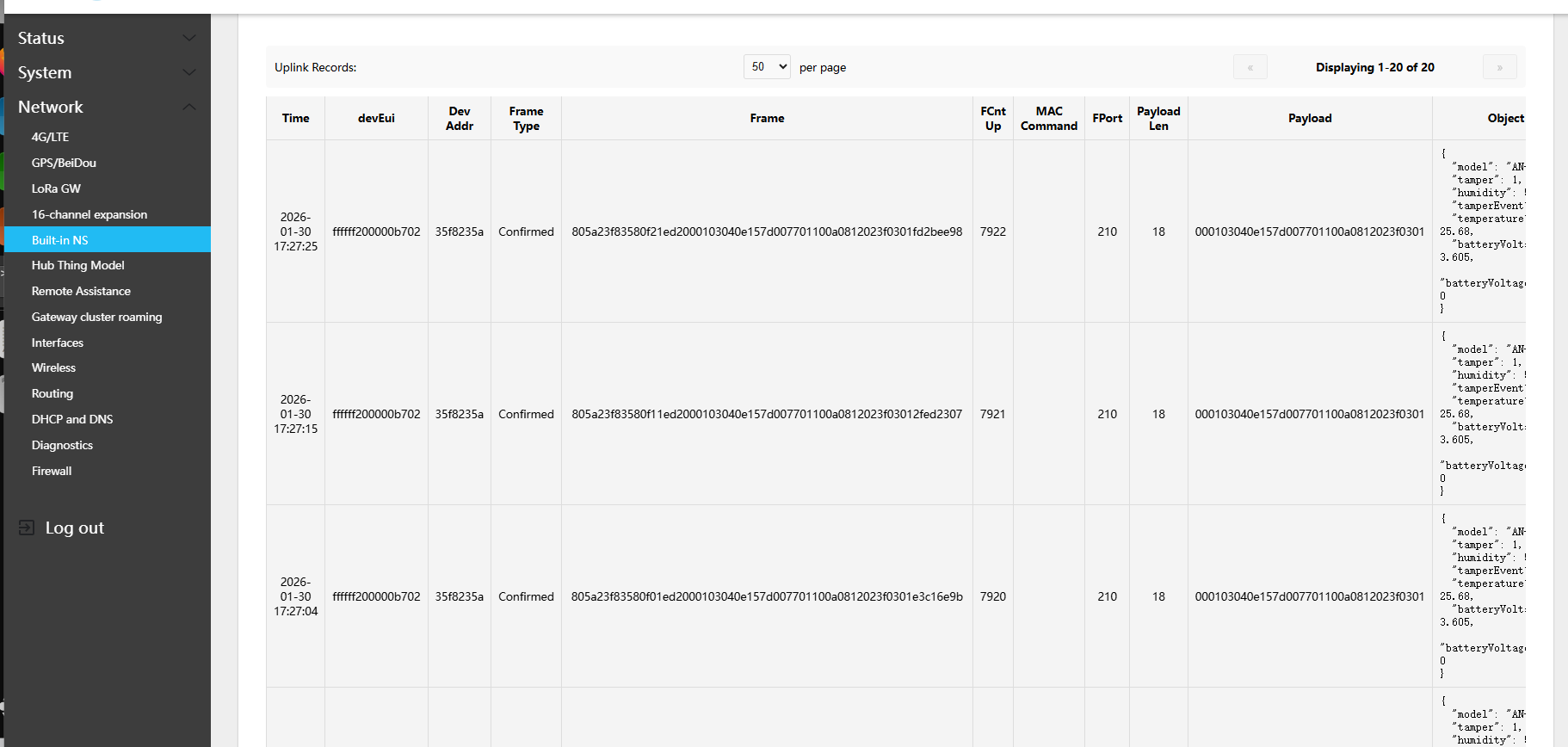
In the gateway Web UI: Network → Built-in NS → Device historical data query
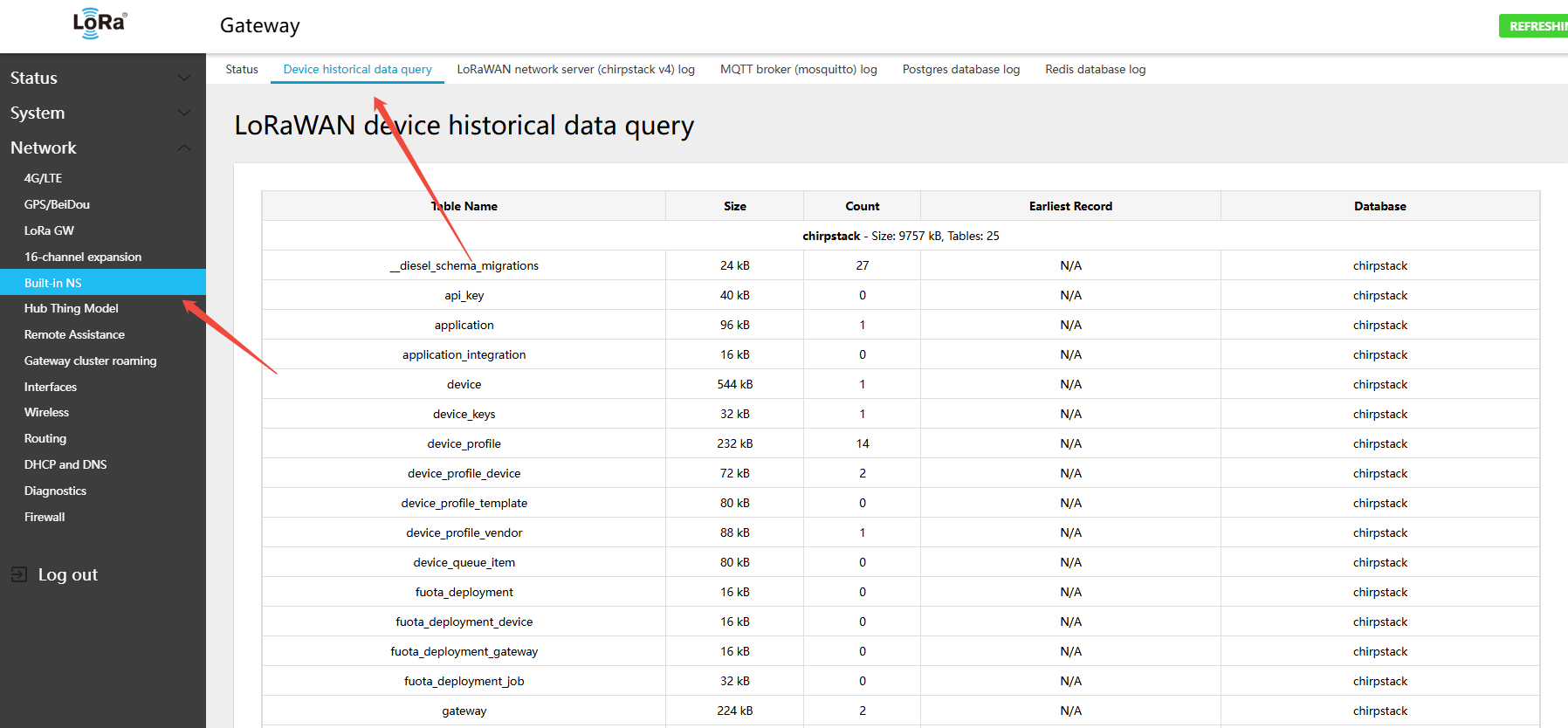
- Query by latest record count or by time range; export device historical data to an Excel spreadsheet
6.4 Device Data Query and Push
6.4.1 Subscribe to Built-in MQTT for Real-time Device Data
6.4.2 Pushing Data as MQTT Client
- The gateway supports MQTT subscribe mode. Default built-in Mosquitto server: MQTT Username:
gateway, MQTT Password:mqtt88888888, Port: 1883, subscribe to ChirpStack topic:application/+/device/+/event/+ - Using the gateway WAN IP
192.168.31.75as an example
guo@ubuntu:~$ mosquitto_sub -h 192.168.31.75 -p 1883 -u gateway -P mqtt88888888 -t application/+/device/+/event/+ -d
Client null sending CONNECT
Client null received CONNACK (0)
Client null sending SUBSCRIBE (Mid: 1, Topic: application/+/device/+/event/+, QoS: 0, Options: 0x00)
Client null received SUBACK
Subscribed (mid: 1): 0
Client null received PUBLISH (d0, q0, r0, m0, 'application/3ef9e6b9-ec54-4eda-86b8-a5fb46899f39/device/ffffff200000b702/event/up', ... (1125 bytes))
{"deduplicationId":"3f9215e0-8980-4274-811a-81c853783625","time":"2026-01-30T09:39:29.090891629+00:00","deviceInfo":{"tenantId":"af1374c6-87f5-4986-93cd-57857e412930","tenantName":"ChirpStack","applicationId":"3ef9e6b9-ec54-4eda-86b8-a5fb46899f39","applicationName":"all_sensor","deviceProfileId":"da1387cd-2814-44e5-9d6b-6746f0514b03","deviceProfileName":"AN-303","deviceName":"ffffff200000b702","devEui":"ffffff200000b702","deviceClassEnabled":"CLASS_A","tags":{}},"devAddr":"35f8235a","adr":true,"dr":3,"fCnt":7993,"fPort":210,"confirmed":true,"data":"AAEDBA4VfQB3ARAKCBICPwMB","rawData":"000103040E157D007701100A0812023F0301","object":{"tamper":1.0,"humidity":57.5,"temperature":25.68,"tamperEvent":1.0,"model":"AN-303","batteryVoltage":3.605,"batteryVoltageState":0.0},"rxInfo":[{"gatewayId":"0010502df45635f8","uplinkId":467,"nsTime":"2026-01-30T09:39:28.964630698+00:00","rssi":-79,"snr":13.75,"channel":2,"location":{},"context":"bPfc5g==","crcStatus":"CRC_OK"}],"txInfo":{"frequency":902700000,"modulation":{"lora":{"bandwidth":125000,"spreadingFactor":7,"codeRate":"CR_4_5","preamble":8}}},"regionConfigId":"us915"}- Provides sample Python script code
# ASCII-only ChirpStack v4 MQTT Event Listener
# All printed output and comments use ASCII characters only.

import paho.mqtt.client as mqtt
import json
import base64
import binascii
from datetime import datetime

def on_connect(client, userdata, flags, rc):
    if rc == 0:
        print("Connected to MQTT broker successfully")
        # Subscribe to application/device events
        client.subscribe("application/+/device/+/event/+")
        client.subscribe("application/+/device/+/event/up")
        client.subscribe("application/+/device/+/event/join")
        client.subscribe("application/+/device/+/event/ack")
        client.subscribe("application/+/device/+/event/error")
        print("Subscribed to topics:")
        print("  - application/+/device/+/event/+")
        print("  - application/+/device/+/event/up")
        print("  - application/+/device/+/event/join")
    else:
        print("Connection failed with code {}".format(rc))

def on_disconnect(client, userdata, rc):
    if rc != 0:
        print("Unexpected disconnection from MQTT broker. Reconnecting...")

def decode_base64_to_hex(base64_str):
    # Decode a base64 string to a hexadecimal string
    try:
        decoded_bytes = base64.b64decode(base64_str)
        return decoded_bytes.hex()
    except:
        return None

def decode_hex_to_ascii(hex_str):
    # Decode a hex string to ASCII text if possible
    try:
        bytes_obj = binascii.unhexlify(hex_str)
        text = bytes_obj.decode('ascii', errors='ignore')
        if any(c.isprintable() for c in text.strip()):
            return text.strip()
    except:
        pass
    return None

def process_uplink_event(topic, payload_dict):
    # Handle uplink events
    print("\n" + "="*80)
    print("UPLINK EVENT RECEIVED")
    print("="*80)

    # Basic information
    device_info = payload_dict.get('deviceInfo', {})
    print("Basic Information:")
    print("  Device EUI:      {}".format(device_info.get('devEui', 'N/A')))
    print("  Device Name:     {}".format(device_info.get('deviceName', 'N/A')))
    print("  Application:     {}".format(device_info.get('applicationName', 'N/A')))
    print("  Device Profile:  {}".format(device_info.get('deviceProfileName', 'N/A')))

    # Transmission details
    print("\nTransmission Details:")
    print("  Time:            {}".format(payload_dict.get('time', 'N/A')))
    print("  DevAddr:         {}".format(payload_dict.get('devAddr', 'N/A')))
    print("  FCnt:            {}".format(payload_dict.get('fCnt', 'N/A')))
    print("  FPort:           {}".format(payload_dict.get('fPort', 'N/A')))
    print("  Data Rate (DR):  {}".format(payload_dict.get('dr', 'N/A')))
    print("  ADR Enabled:     {}".format(payload_dict.get('adr', 'N/A')))
    print("  Confirmed:       {}".format(payload_dict.get('confirmed', 'N/A')))

    # Data analysis
    print("\nData Analysis:")

    # data field (base64)
    data_base64 = payload_dict.get('data')
    if data_base64:
        print("  'data' (base64): {}".format(data_base64))
        data_hex = decode_base64_to_hex(data_base64)
        if data_hex:
            print("  'data' decoded (hex): {}".format(data_hex))
            data_ascii = decode_hex_to_ascii(data_hex)
            if data_ascii:
                print("  'data' as text: '{}'".format(data_ascii))

    # rawData field (hex)
    raw_data = payload_dict.get('rawData')
    if raw_data:
        print("  'rawData' (hex): {}".format(raw_data))
        raw_data_ascii = decode_hex_to_ascii(raw_data)
        if raw_data_ascii:
            print("  'rawData' as text: '{}'".format(raw_data_ascii))

    # Decoded object field
    object_data = payload_dict.get('object')
    if object_data:
        print("\nDecoded Sensor Data:")
        for key, value in object_data.items():
            print("  {:25} {}".format(key, value))

    # Received gateway information
    rx_info = payload_dict.get('rxInfo', [])
    if rx_info:
        print("\nReceived by {} gateway(s):".format(len(rx_info)))
        for i, rx in enumerate(rx_info):
            gateway_id = rx.get('gatewayId', 'Unknown')
            rssi = rx.get('rssi', 'N/A')
            snr = rx.get('snr', 'N/A')
            channel = rx.get('channel', 'N/A')
            print("  Gateway {}: {}".format(i+1, gateway_id))
            print("    RSSI: {} dBm, SNR: {} dB, Channel: {}".format(rssi, snr, channel))

    # Transmission info
    tx_info = payload_dict.get('txInfo', {})
    if tx_info:
        print("\nTransmission Info:")
        print("  Frequency: {} Hz".format(tx_info.get('frequency', 'N/A')))
        modulation = tx_info.get('modulation', {})
        if 'lora' in modulation:
            lora = modulation['lora']
            print("  LoRa Modulation:")
            print("    Bandwidth:     {} Hz".format(lora.get('bandwidth', 'N/A')))
            print("    Spreading:     SF{}".format(lora.get('spreadingFactor', 'N/A')))
            print("    Code Rate:     {}".format(lora.get('codeRate', 'N/A')))

    print("\nAdditional Info:")
    print("  Deduplication ID: {}".format(payload_dict.get('deduplicationId', 'N/A')))
    print("  Region Config ID: {}".format(payload_dict.get('regionConfigId', 'N/A')))

    print("="*80)

def process_join_event(topic, payload_dict):
    # Handle device join events
    print("\n" + "="*80)
    print("JOIN EVENT RECEIVED")
    print("="*80)

    device_info = payload_dict.get('deviceInfo', {})
    print("Device Information:")
    print("  Device EUI:      {}".format(device_info.get('devEui', 'N/A')))
    print("  Device Name:     {}".format(device_info.get('deviceName', 'N/A')))
    print("  Application:     {}".format(device_info.get('applicationName', 'N/A')))
    print("  Tenant:          {}".format(device_info.get('tenantName', 'N/A')))

    print("\nJoin Details:")
    print("  Time:            {}".format(payload_dict.get('time', 'N/A')))
    print("  DevAddr:         {}".format(payload_dict.get('devAddr', 'N/A')))

    # Device capabilities
    dev_class = device_info.get('deviceClassEnabled', 'N/A')
    print("  Device Class:    {}".format(dev_class))

    # Tags if present
    tags = device_info.get('tags', {})
    if tags:
        print("\nDevice Tags:")
        for key, value in tags.items():
            print("  {}: {}".format(key, value))

    print("="*80)

def process_ack_event(topic, payload_dict):
    # Handle ACK events
    print("\n" + "="*80)
    print("ACKNOWLEDGEMENT RECEIVED")
    print("="*80)

    device_info = payload_dict.get('deviceInfo', {})
    print("Device: {} ({})".format(device_info.get('devEui', 'N/A'), device_info.get('deviceName', 'N/A')))
    print("Details:")
    print("  Time:    {}".format(payload_dict.get('time', 'N/A')))
    print("  FCnt:    {}".format(payload_dict.get('fCnt', 'N/A')))
    print("  Acknowledged: True")
    print("="*80)

def process_error_event(topic, payload_dict):
    # Handle error events
    print("\n" + "="*80)
    print("ERROR EVENT RECEIVED")
    print("="*80)

    device_info = payload_dict.get('deviceInfo', {})
    print("Device: {} ({})".format(device_info.get('devEui', 'N/A'), device_info.get('deviceName', 'N/A')))
    print("Error Details:")
    print("  Time:    {}".format(payload_dict.get('time', 'N/A')))
    print("  Type:    {}".format(payload_dict.get('type', 'N/A')))
    print("  Error:   {}".format(payload_dict.get('error', 'N/A')))
    print("  FCnt:    {}".format(payload_dict.get('fCnt', 'N/A')))
    print("="*80)

def on_message(client, userdata, msg):
    try:
        # Decode message
        payload = msg.payload.decode('utf-8')
        payload_dict = json.loads(payload)

        # Current time
        current_time = datetime.now().strftime("%Y-%m-%d %H:%M:%S")

        # Parse topic
        topic_parts = msg.topic.split('/')
        if len(topic_parts) >= 6:
            application_id = topic_parts[1]
            device_id = topic_parts[3]
            event_type = topic_parts[5]

            print("\nMessage received at {}".format(current_time))
            print("  Topic: {}".format(msg.topic))
            print("  Application: {}".format(application_id))
            print("  Device: {}".format(device_id))
            print("  Event: {}".format(event_type))
            print("  QoS: {}".format(msg.qos))
            print("  Retain: {}".format(msg.retain))
        else:
            print("\nMessage received at {}".format(current_time))
            print("  Topic: {}".format(msg.topic))

        # Dispatch based on event type
        if "event/up" in msg.topic:
            process_uplink_event(msg.topic, payload_dict)
        elif "event/join" in msg.topic:
            process_join_event(msg.topic, payload_dict)
        elif "event/ack" in msg.topic:
            process_ack_event(msg.topic, payload_dict)
        elif "event/error" in msg.topic:
            process_error_event(msg.topic, payload_dict)
        else:
            # Unknown event type, print raw JSON with ASCII escaping
            print("\nUnknown event type, raw payload:")
            print(json.dumps(payload_dict, indent=2, ensure_ascii=True))

    except json.JSONDecodeError as e:
        print("\nJSON Decode Error: {}".format(e))
        print("Raw payload (first 500 bytes): {}".format(msg.payload[:500]))
    except UnicodeDecodeError as e:
        print("\nUnicode Decode Error: {}".format(e))
        print("Raw payload (hex): {}...".format(msg.payload.hex()[:100]))
    except Exception as e:
        print("\nError processing message: {}".format(e))
        import traceback
        traceback.print_exc()

def main():
    # MQTT client configuration
    client_id = "chirpstack-listener-{}".format(datetime.now().strftime('%Y%m%d%H%M%S'))
    client = mqtt.Client(client_id=client_id, protocol=mqtt.MQTTv311)

    # Set username and password
    client.username_pw_set("gateway", "mqtt88888888")

    # Set callbacks
    client.on_connect = on_connect
    client.on_message = on_message
    client.on_disconnect = on_disconnect

    # Reconnect options
    client.reconnect_delay_set(min_delay=1, max_delay=120)

    print("="*80)
    print("ChirpStack v4 MQTT Event Listener")
    print("="*80)
    print("Client ID: {}".format(client_id))
    print("Broker: localhost:1883")
    print("Username: gateway")
    print("Starting connection...")

    try:
        # Connect to MQTT broker
        client.connect("localhost", 1883, 60)

        # Start loop
        print("\nStarting MQTT loop...")
        print("Press Ctrl+C to stop\n")

        client.loop_forever()

    except KeyboardInterrupt:
        print("\n\nReceived interrupt signal. Disconnecting...")
        client.disconnect()
        print("Disconnected from MQTT broker")
    except Exception as e:
        print("\nFailed to connect to MQTT broker: {}".format(e))

if __name__ == "__main__":
main()- Run the script to receive data as follows:
root@Gateway:~# python /root/python-SDK/mqtt_event_listener.py
================================================================================
ChirpStack v4 MQTT Event Listener
================================================================================
Client ID: chirpstack-listener-20260130174156
Broker: localhost:1883
Username: gateway
Starting connection...

Starting MQTT loop...
Press Ctrl+C to stop

Connected to MQTT broker successfully
Subscribed to topics:
  - application/+/device/+/event/+
  - application/+/device/+/event/up
  - application/+/device/+/event/join

Message received at 2026-01-30 17:42:05
  Topic: application/3ef9e6b9-ec54-4eda-86b8-a5fb46899f39/device/ffffff200000b702/event/up
  Application: 3ef9e6b9-ec54-4eda-86b8-a5fb46899f39
  Device: ffffff200000b702
  Event: up
  QoS: 0
  Retain: 0

================================================================================
UPLINK EVENT RECEIVED
================================================================================
Basic Information:
  Device EUI:      ffffff200000b702
  Device Name:     ffffff200000b702
  Application:     all_sensor
  Device Profile:  AN-303

Transmission Details:
  Time:            2026-01-30T09:42:05.675897655+00:00
  DevAddr:         35f8235a
  FCnt:            8008
  FPort:           210
  Data Rate (DR):  3
  ADR Enabled:     True
  Confirmed:       True

Data Analysis:
  'data' (base64): AAEDBA4VfQB3ARAKCBICPwMB
  'data' decoded (hex): 000103040e157d007701100a0812023f0301
  'data' as text: '}w                                                                                                                                                                                                    ?'
  'rawData' (hex): 000103040E157D007701100A0812023F0301
  'rawData' as text: '}w                                                                                                                                                                                                 ?'

Decoded Sensor Data:
  batteryVoltage            3.605
  temperature               25.68
  tamperEvent               1.0
  model                     AN-303
  tamper                    1.0
  batteryVoltageState       0.0
  humidity                  57.5

Received by 1 gateway(s):
  Gateway 1: 0010502df45635f8
    RSSI: -83 dBm, SNR: 13.5 dB, Channel: 7

Transmission Info:
  Frequency: 903700000 Hz
  LoRa Modulation:
    Bandwidth:     125000 Hz
    Spreading:     SF7
    Code Rate:     CR_4_5

Additional Info:
  Deduplication ID: d61b9b59-7998-483e-9432-3901e03b5217
  Region Config ID: us915
================================================================================
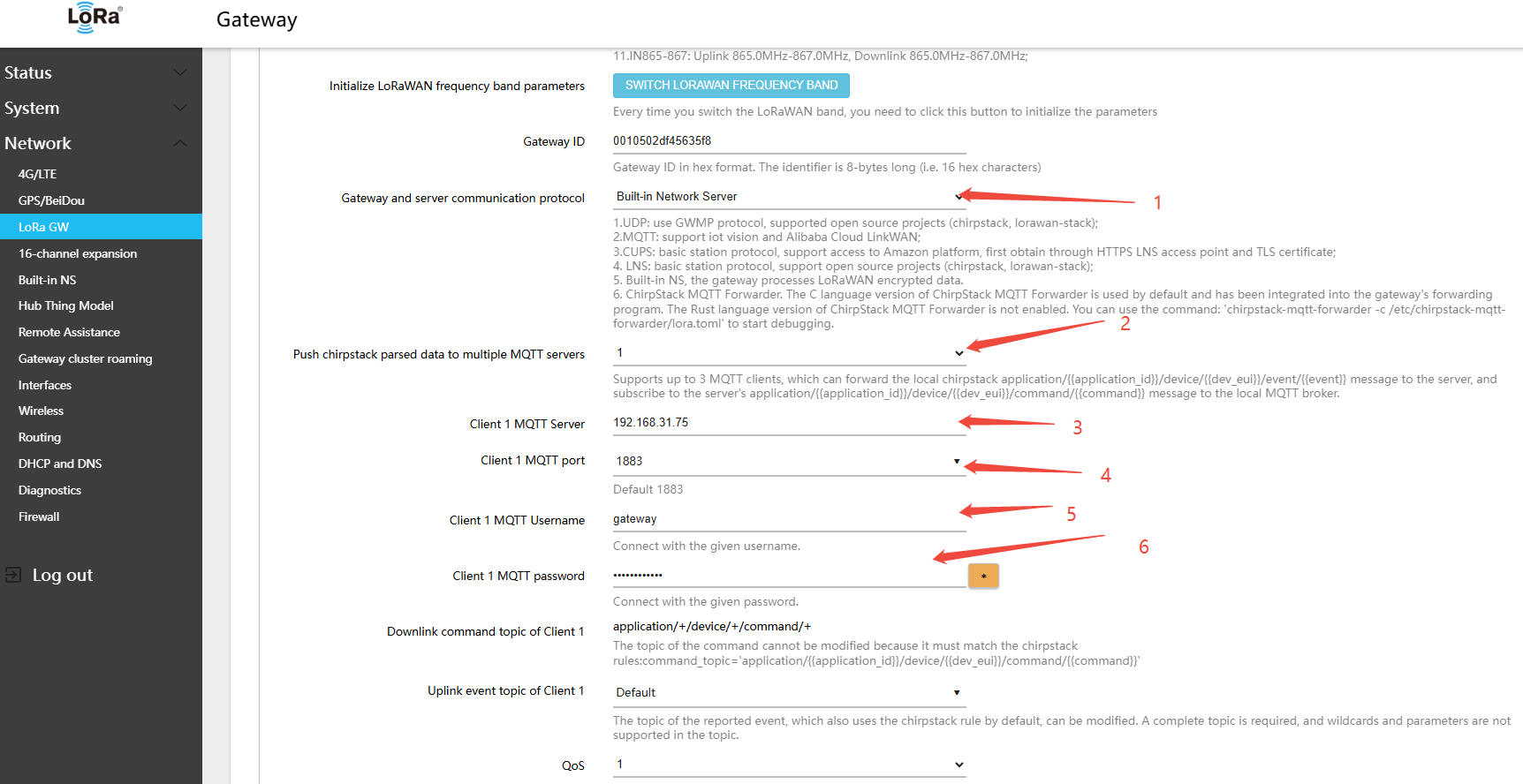
6.4.2 Gateway as MQTT Client Pushing Device Data
- The gateway supports push mode — the gateway acts as an MQTT client and pushes data to the customer's MQTT server
- Navigate to the gateway Web page: Network → LoRa GW → Configuration, and configure as follows:
- Gateway and server communication protocol (gateway-to-server communication protocol):Built-in Network Server
- Push chirpstack parsed data to multiple MQTT servers: Select 1 or more as needed
- Client 1 MQTT Server: Enter the actual MQTT broker address of the customer
- Client 1 MQTT port: 1883 (or the actual port for the customer's MQTT broker)
- Client 1 MQTT Username: Enter the actual MQTT broker username of the customer
- Client 1 MQTT password: Enter the actual password for the customer's MQTT broker
- Other parameters: enter as required
6.4.3 HTTP Push Data
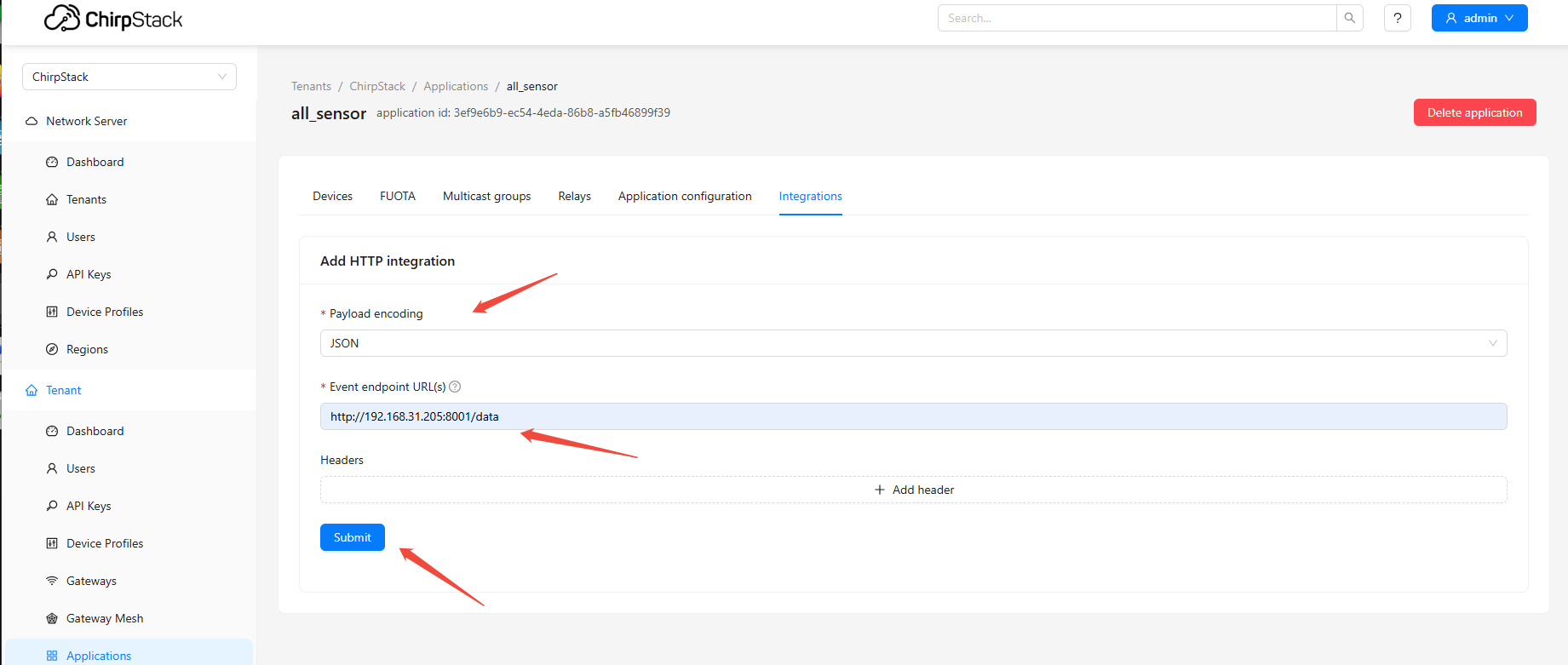
- HTTP push can be configured in the built-in ChirpStack UI
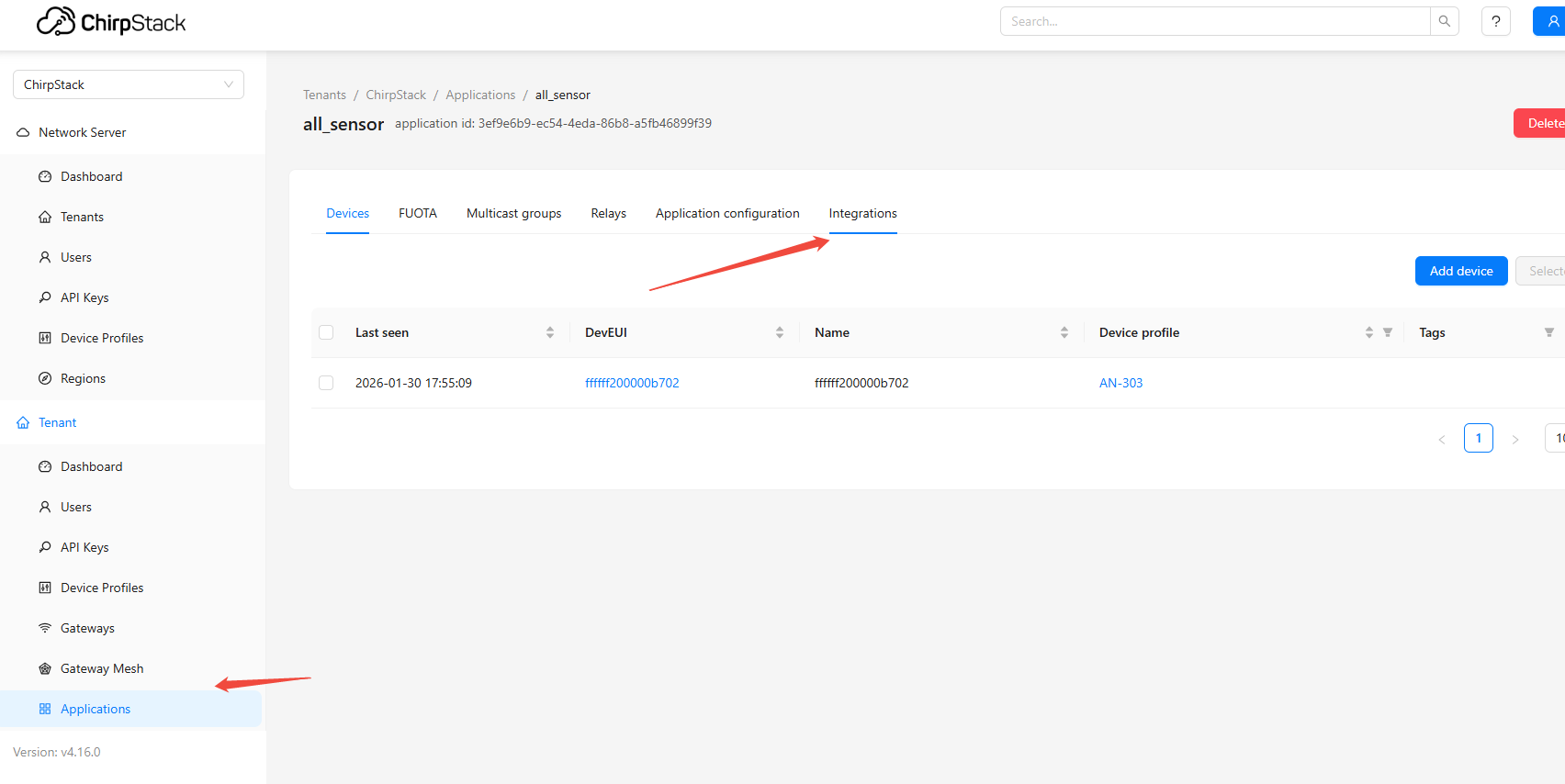
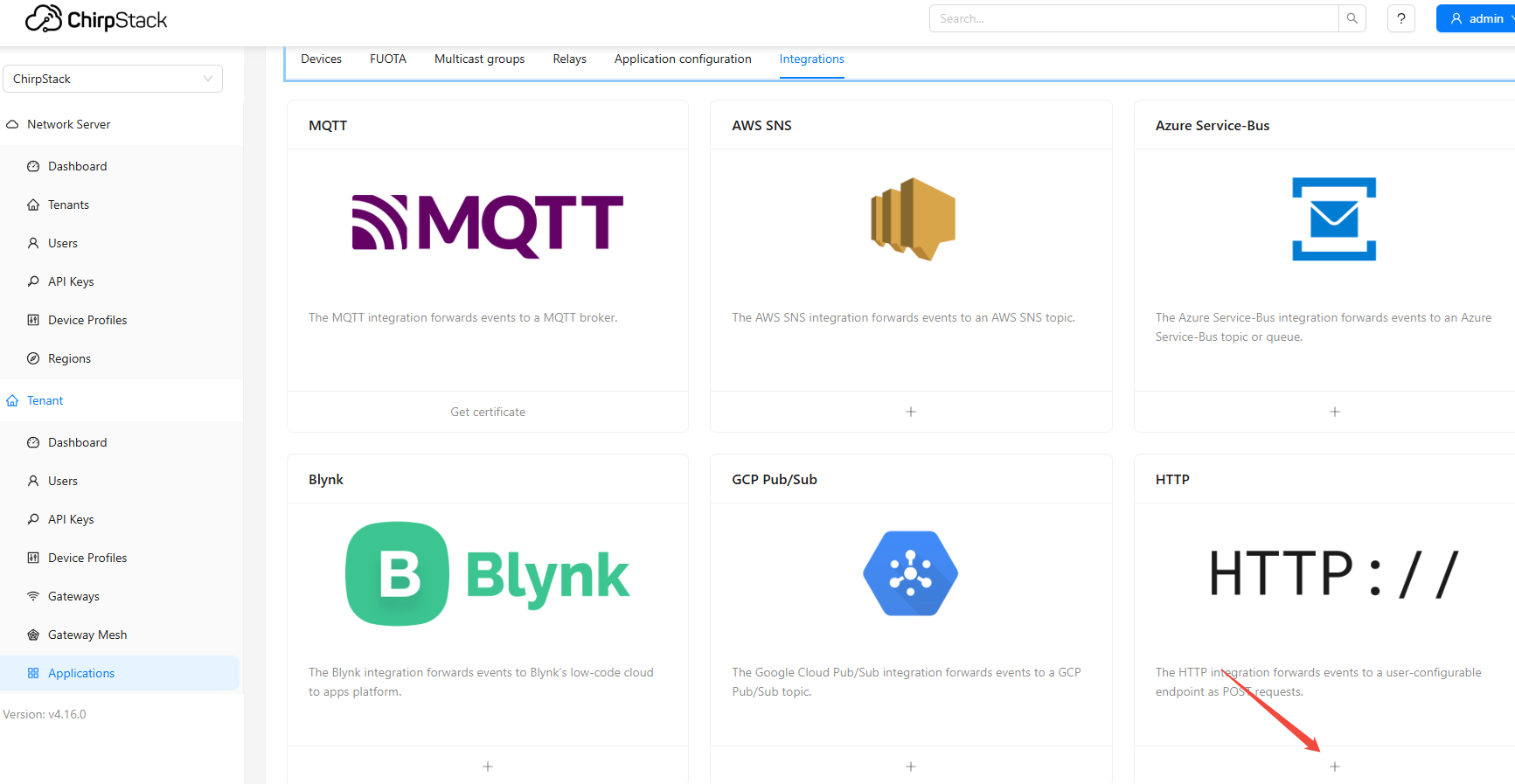
- Example: HTTP POST to
http://192.168.31.205:8001/data
- Provides sample Python script code for receiving and parsing HTTP push data
from http.server import HTTPServer, BaseHTTPRequestHandler
from urllib.parse import urlparse, parse_qs
import json
import base64
import binascii

from chirpstack_api import integration
from google.protobuf.json_format import Parse


class Handler(BaseHTTPRequestHandler):
    # True -  JSON marshaler
    # False - Protobuf marshaler (binary)
    json = True

    def do_POST(self):
        self.send_response(200)
        self.end_headers()
        query_args = parse_qs(urlparse(self.path).query)

        content_len = int(self.headers.get('Content-Length', 0))
        body = self.rfile.read(content_len)

        # First print the raw HTTP request information
        print(f"\n{'='*80}")
        print(f"Received HTTP POST request:")
        print(f"  Path: {self.path}")
        print(f"  Event: {query_args.get('event', ['unknown'])[0]}")
        print(f"  Content-Length: {content_len}")
        print(f"  Headers: {dict(self.headers.items())}")

        # Print raw JSON data
        try:
            raw_json = body.decode('utf-8')
            print(f"\nRaw JSON data received:")
            print(f"{'-'*40}")
            print(raw_json)
            print(f"{'-'*40}")

            # Pretty-print JSON
            parsed_json = json.loads(raw_json)
            print(f"\nFormatted JSON data:")
            print(json.dumps(parsed_json, indent=2, ensure_ascii=False))
        except Exception as e:
            print(f"Error parsing JSON: {e}")
            print(f"Raw body (hex): {body.hex()}")

        if query_args["event"][0] == "up":
            self.up(body)

        elif query_args["event"][0] == "join":
            self.join(body)

        else:
            print(f"Handler for event {query_args['event'][0]} is not implemented")

    def up(self, body):
        try:
            # 1. First parse into a dictionary to view the structure
            data_dict = json.loads(body.decode('utf-8'))

            print(f"\n{'='*80}")
            print("Processing Uplink Event:")
            print(f"  Device EUI: {data_dict.get('deviceInfo', {}).get('devEui', 'unknown')}")
            print(f"  Device Name: {data_dict.get('deviceInfo', {}).get('deviceName', 'unknown')}")
            print(f"  FCnt: {data_dict.get('fCnt', 'unknown')}")
            print(f"  FPort: {data_dict.get('fPort', 'unknown')}")

            # 2. Check fields
            print(f"\nField Analysis:")
            print(f"  Has 'data' field: {'data' in data_dict}")
            print(f"  Has 'rawData' field: {'rawData' in data_dict}")

            if 'data' in data_dict:
                print(f"  'data' field value: {data_dict['data']}")
                try:
                    # Attempt to decode the base64 data field
                    decoded_data = base64.b64decode(data_dict['data'])
                    print(f"  Decoded 'data' (hex): {decoded_data.hex()}")
                    print(f"  Decoded 'data' (bytes): {decoded_data}")
                except:
                    print(f"  'data' field is not base64 encoded")

            if 'rawData' in data_dict:
                print(f"  'rawData' field value: {data_dict['rawData']}")
                print(f"  'rawData' length: {len(data_dict['rawData'])}")

            # 3. Check object field
            if 'object' in data_dict:
                print(f"\nDecoded Object Fields:")
                for key, value in data_dict['object'].items():
                    print(f"  {key}: {value}")

            # 4. Attempt to parse as Protobuf
            print(f"\nTrying to parse with Protobuf...")
            try:
                # Create a new dictionary without the rawData field
                proto_dict = data_dict.copy()
                if 'rawData' in proto_dict:
                    # If needed, convert rawData to the data field
                    # However, based on your error, Protobuf expects the "data" field, not "rawData"
                    del proto_dict['rawData']

                # Use ignore_unknown_fields=True to ignore unknown fields
                up = Parse(json.dumps(proto_dict), integration.UplinkEvent(), ignore_unknown_fields=True)
                print(f"  Successfully parsed Protobuf message")
                print(f"  Device EUI from Protobuf: {up.device_info.dev_eui}")
                if up.data:
                    print(f"  Data from Protobuf (hex): {up.data.hex()}")
                else:
                    print(f"  No data field in Protobuf message")
            except Exception as e:
                print(f"  Error parsing with Protobuf: {e}")

            # 5. 处理rxInfo
            if 'rxInfo' in data_dict:
                print(f"\nReceived by {len(data_dict['rxInfo'])} gateway(s):")
                for i, rx in enumerate(data_dict['rxInfo']):
                    print(f"  Gateway {i+1}: {rx.get('gatewayId', 'unknown')} - RSSI: {rx.get('rssi', 'unknown')}, SNR: {rx.get('snr', 'unknown')}")

            print(f"{'='*80}\n")

        except Exception as e:
            print(f"\nError processing uplink: {e}")
            import traceback
            traceback.print_exc()

    def join(self, body):
        try:
            data_dict = json.loads(body.decode('utf-8'))

            print(f"\n{'='*80}")
            print("Processing Join Event:")
            print(f"  Device EUI: {data_dict.get('deviceInfo', {}).get('devEui', 'unknown')}")
            print(f"  Device Name: {data_dict.get('deviceInfo', {}).get('deviceName', 'unknown')}")
            print(f"  DevAddr: {data_dict.get('devAddr', 'unknown')}")
            print(f"  Application: {data_dict.get('deviceInfo', {}).get('applicationName', 'unknown')}")

            # Attempt to parse as Protobuf
            proto_dict = data_dict.copy()
            join = Parse(json.dumps(proto_dict), integration.JoinEvent(), ignore_unknown_fields=True)
            print(f"\nSuccessfully parsed Protobuf join message")
            print(f"  Device EUI from Protobuf: {join.device_info.dev_eui}")
            print(f"  DevAddr from Protobuf: {join.dev_addr}")

            print(f"{'='*80}\n")

        except Exception as e:
            print(f"\nError processing join: {e}")
            import traceback
            traceback.print_exc()

    def unmarshal(self, body, pl):
        if self.json:
            return Parse(body, pl, ignore_unknown_fields=True)

        pl.ParseFromString(body)
        return pl

    def log_message(self, format, *args):
        """Override the log method to reduce default log output."""
        # You can uncomment the following line to view the HTTP access log
        # print(f"HTTP: {format % args}")
        pass


if __name__ == "__main__":
    httpd = HTTPServer(('0.0.0.0', 8001), Handler)
    print("=" * 80)
    print("ChirpStack v4 HTTP Event Listener")
    print("Listening on port 8001")
    print("Ready to receive events...")
    print("=" * 80)
httpd.serve_forever()- Run the script to receive data as follows:
root@Gateway:~# python3 /root/python-SDK/http_event_listener.py
================================================================================
ChirpStack v4 HTTP Event Listener
Listening on port 8001
Ready to receive events...
================================================================================

================================================================================
Received HTTP POST request:
  Path: /data?event=up
  Event: up
  Content-Length: 1124
  Headers: {'content-type': 'application/json', 'accept': '*/*', 'host': '192.168.31.205:8001', 'content-length': '1124'}

Raw JSON data received:
----------------------------------------
{"deduplicationId":"d4147289-5dc9-45c7-94b7-14d44f4dc1ce","time":"2026-01-30T10:01:51.329855273+00:00","deviceInfo":{"tenantId":"af1374c6-87f5-4986-93cd-57857e412930","tenantName":"ChirpStack","applicationId":"3ef9e6b9-ec54-4eda-86b8-a5fb46899f39","applicationName":"all_sensor","deviceProfileId":"da1387cd-2814-44e5-9d6b-6746f0514b03","deviceProfileName":"AN-303","deviceName":"ffffff200000b702","devEui":"ffffff200000b702","deviceClassEnabled":"CLASS_A","tags":{}},"devAddr":"35f8235a","adr":true,"dr":3,"fCnt":8123,"fPort":210,"confirmed":true,"data":"AAEDBA4VfQB3ARAKCBICPwMB","rawData":"000103040E157D007701100A0812023F0301","object":{"batteryVoltageState":0.0,"tamper":1.0,"temperature":25.68,"humidity":57.5,"model":"AN-303","batteryVoltage":3.605,"tamperEvent":1.0},"rxInfo":[{"gatewayId":"0010502df45635f8","uplinkId":620,"nsTime":"2026-01-30T10:01:51.204207430+00:00","rssi":-86,"snr":11.5,"channel":1,"location":{},"context":"sAHeNg==","crcStatus":"CRC_OK"}],"txInfo":{"frequency":902500000,"modulation":{"lora":{"bandwidth":125000,"spreadingFactor":7,"codeRate":"CR_4_5","preamble":8}}},"regionConfigId":"us915"}
----------------------------------------

Formatted JSON data:
{
  "deduplicationId": "d4147289-5dc9-45c7-94b7-14d44f4dc1ce",
  "time": "2026-01-30T10:01:51.329855273+00:00",
  "deviceInfo": {
    "tenantId": "af1374c6-87f5-4986-93cd-57857e412930",
    "tenantName": "ChirpStack",
    "applicationId": "3ef9e6b9-ec54-4eda-86b8-a5fb46899f39",
    "applicationName": "all_sensor",
    "deviceProfileId": "da1387cd-2814-44e5-9d6b-6746f0514b03",
    "deviceProfileName": "AN-303",
    "deviceName": "ffffff200000b702",
    "devEui": "ffffff200000b702",
    "deviceClassEnabled": "CLASS_A",
    "tags": {}
  },
  "devAddr": "35f8235a",
  "adr": true,
  "dr": 3,
  "fCnt": 8123,
  "fPort": 210,
  "confirmed": true,
  "data": "AAEDBA4VfQB3ARAKCBICPwMB",
  "rawData": "000103040E157D007701100A0812023F0301",
  "object": {
    "batteryVoltageState": 0.0,
    "tamper": 1.0,
    "temperature": 25.68,
    "humidity": 57.5,
    "model": "AN-303",
    "batteryVoltage": 3.605,
    "tamperEvent": 1.0
  },
  "rxInfo": [
    {
      "gatewayId": "0010502df45635f8",
      "uplinkId": 620,
      "nsTime": "2026-01-30T10:01:51.204207430+00:00",
      "rssi": -86,
      "snr": 11.5,
      "channel": 1,
      "location": {},
      "context": "sAHeNg==",
      "crcStatus": "CRC_OK"
    }
  ],
  "txInfo": {
    "frequency": 902500000,
    "modulation": {
      "lora": {
        "bandwidth": 125000,
        "spreadingFactor": 7,
        "codeRate": "CR_4_5",
        "preamble": 8
      }
    }
  },
  "regionConfigId": "us915"
}

================================================================================
Processing Uplink Event:
  Device EUI: ffffff200000b702
  Device Name: ffffff200000b702
  FCnt: 8123
  FPort: 210

Field Analysis:
  Has 'data' field: True
  Has 'rawData' field: True
  'data' field value: AAEDBA4VfQB3ARAKCBICPwMB
  Decoded 'data' (hex): 000103040e157d007701100a0812023f0301
  Decoded 'data' (bytes): b'\x00\x01\x03\x04\x0e\x15}\x00w\x01\x10\n\x08\x12\x02?\x03\x01'
  'rawData' field value: 000103040E157D007701100A0812023F0301
  'rawData' length: 36

Decoded Object Fields:
  batteryVoltageState: 0.0
  tamper: 1.0
  temperature: 25.68
  humidity: 57.5
  model: AN-303
  batteryVoltage: 3.605
  tamperEvent: 1.0

Trying to parse with Protobuf...
  Successfully parsed Protobuf message
  Device EUI from Protobuf: ffffff200000b702
  Data from Protobuf (hex): 000103040e157d007701100a0812023f0301

Received by 1 gateway(s):
  Gateway 1: 0010502df45635f8 - RSSI: -86, SNR: 11.5
================================================================================